The Hub: Navigation Menu
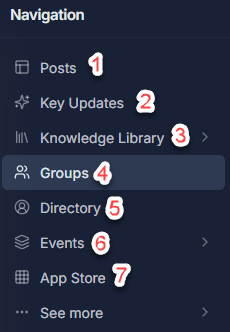
On the left side of The Hub, you will find a Navigation menu like in the image below. If you do not see the navigation menu like in the image below, you may need to expand it by clicking the button with the arrows in the bottom-left below your profile picture  . You can reference the numbers below the image to find out more about each option:
1. Posts
1. Posts
Posts takes you to The Hub homepage where you will see your "feed" like you would find in other social media platforms. You should find posts here from groups you are a member of and individuals that you follow.
2. Key Updates
2. Key Updates
Here you will find important announcements, featured posts, and key updates from leadership and groups across the eXp network.
3. Knowledge Library
3. Knowledge Library
Coming Soon!
4. Groups
This section allows you to access and create different Groups in The Hub. You can find more information about Groups in The Hub in the article linked here: The Hub: Groups Menu
5. Directory
The Directory allows you to search for other eXp Agents and Staff that are in The Hub, allowing you to connect with them through the platform.
6. Events
Discover events near you! Here, you can view events being held by other eXp Agents or staff as well as create your own event.
7. App Store
This is where you will find applications for use in The Hub. You can find more information about this section in the article linked here: The Hub: App Store
If you have any questions about this or run into any issues, you can contact Technical Support at support@exprealty.net or in exp.world at https://exp.world/techsupport-agent
If you have any questions about this or run into any issues, you can contact Technical Support at support@exprealty.net or in exp.world at https://exp.world/techsupport-agent