The Hub: Customizing Right Home Page Sidebar
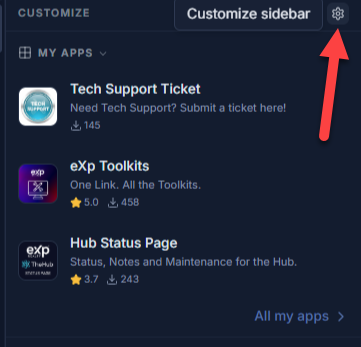
In the Hub, you can customize the right side-bar by clicking the gear icon in the top-right:
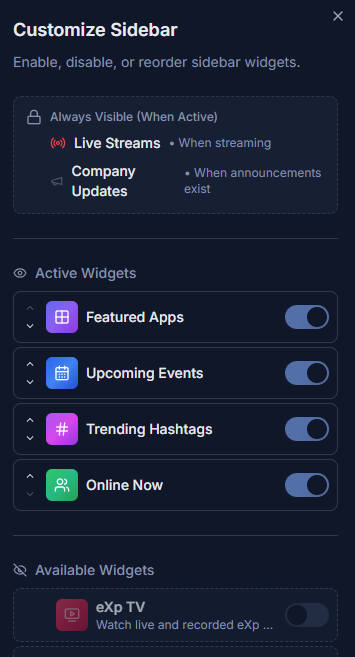
This will allow you to view the "Customize Sidebar" menu that allows you to move the active widgets up and down to different positions, as well as make available widgets active or deactivate some of your currently active widgets:
Related Articles
The Hub: Profile Settings
To access your profile settings in The Hub, click on your profile picture at the bottom-left corner of the screen: Once you have clicked on it, select the "Settings" option in the menu that pops up: You should now be in the settings menu with the ...
The Hub: App Store
In The Hub's navigation menu on the left side, you can find an option for the "App Store": Here you will find applications that have been approved for use in The Hub. There is a toggle in the top-right to switch between the Apps "Desktop" or "Store": ...
The Hub: Navigation Menu
On the left side of The Hub, you will find a Navigation menu like in the image below. If you do not see the navigation menu like in the image below, you may need to expand it by clicking the button with the arrows in the bottom-left below your ...
The Hub: Creating a Group
To create a group in The Hub, you will first want to navigate to the "Groups" option on the left and click on it: Once there, you will click the "+Create Group" button in the top-right: Enter the required info for Group Name, Category, Description, ...
The Hub: Groups Menu
You can get to the Groups menu in The Hub by clicking "Groups" on the left side-menu: Below, you can find a number-coded image explaining the different options available there: 1. My Groups: Clicking this option will show you the groups that you ...